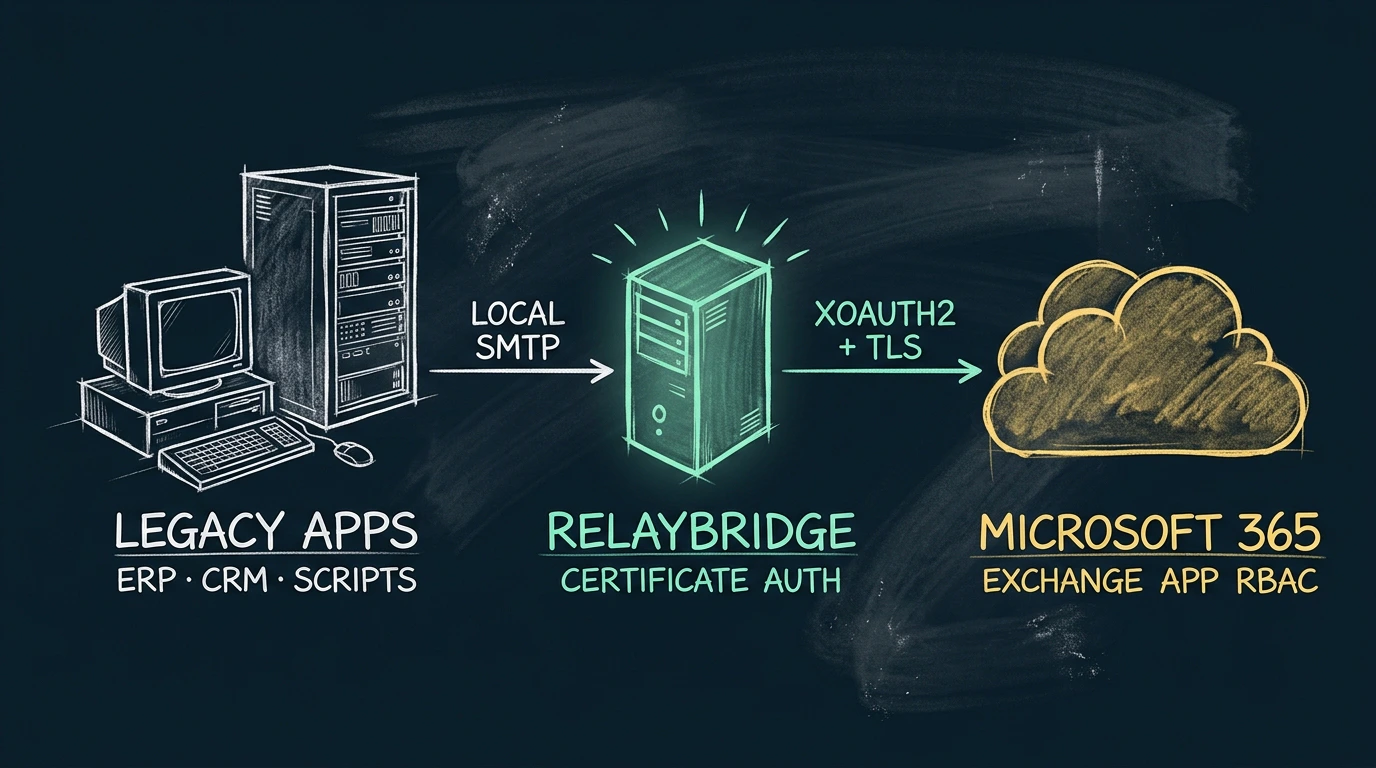
Protocol and identity are separate
A legacy application may produce valid SMTP messages for years without understanding OAuth. Modernizing that path means deciding where token acquisition, application identity, Exchange authorization, TLS, retry, and durable queueing should live. Start with the Microsoft 365 SMTP options comparison when the upstream method is not yet fixed.
The application compatibility problem
Line-of-business systems, monitoring tools, reporting servers, appliances, and scheduled jobs often expose a fixed SMTP client: enter a host, port, sender, and optional credentials. Their business function may still be essential, but their mail module may be frozen to older authentication methods.
Exchange Online supports SMTP submission scenarios, but the client must meet the requirements of the selected method. When software cannot be updated to do so directly, administrators can either change the mail-flow approach, replace or modify the application, or introduce a compatibility boundary.
SMTP AUTH versus authentication method
SMTP AUTH is not synonymous with basic authentication. It is the SMTP extension through which a client authenticates. A client might implement a password-based mechanism, or it might use OAuth and present a bearer token through XOAUTH2.
Microsoft documents SMTP AUTH as typically using TCP port 587 in Exchange Online and supporting modern authentication through OAuth. Exchange provides organization-wide and per-mailbox controls for the protocol. An application’s checkbox labeled “SMTP authentication” does not reveal which mechanism it implements, so administrators need the product’s protocol documentation or an observed SMTP capability exchange.
OAuth and XOAUTH2 at a high level
OAuth answers how the client obtains authority to access a protected resource. For an unattended service, Microsoft supports a client credentials flow in which an application acts as itself rather than as an interactively signed-in user. The requested access token is for the Exchange resource.
XOAUTH2 answers how that token is carried inside the SMTP authentication conversation. Microsoft’s documented SASL format combines the sender identity and bearer token, encodes them, and submits the result with AUTH XOAUTH2. The token is not a drop-in replacement for the password field unless the SMTP library explicitly supports this mechanism and token renewal.
OAuth is the authorization framework and token flow. XOAUTH2 is the SMTP authentication mechanism that presents the resulting bearer token.
Certificate-based application identity
Microsoft Entra confidential clients can authenticate with a certificate instead of a shared client secret. The application holds the private key and uses it to sign a client assertion; Microsoft Entra has the associated public certificate material needed to verify that assertion. The private key is not uploaded to Microsoft.
This removes a permanent shared secret from the service configuration, but it does not eliminate credential management. The private key must remain protected locally, certificate lifetime and rotation must be managed, and access to the identity must be limited to the service that needs it.
Why legacy applications may not support OAuth directly
Direct support requires more than the ability to issue SMTP commands. The application needs an OAuth-capable identity library or equivalent implementation, certificate or other credential handling, correct token endpoint and resource selection, token caching and renewal, XOAUTH2 support in its SMTP stack, and current TLS behavior.
Some applications can be extended with a supported mail plug-in or upgraded release. Others have hard-coded fields and an unmaintained SMTP library. In the latter case, placing modern authentication outside the legacy process can be less disruptive than modifying a stable business application—but it creates a separate infrastructure component whose security and availability must be operated deliberately.
Separating local SMTP intake from modern delivery
A compatibility bridge terminates the legacy application’s local SMTP session and starts a new, independently authenticated upstream session. That separation allows the local application to retain its narrow mail interface while the bridge owns token acquisition, TLS, queueing, retries, and the Exchange response.
The bridge should not be an open relay. Local intake needs explicit source and sender restrictions, and the service must not advertise the local hop as encrypted when it is not.
Delivery semantics
SMTP has multiple success boundaries. RelayBridge is designed to accept a local message only after durable persistence, then retry temporary upstream failures. When Exchange Online returns a successful final SMTP 250 response, Microsoft has accepted responsibility for the message at its SMTP boundary.
That response does not promise inbox placement. Exchange Online may still apply transport rules, filtering, routing, moderation, quarantine, or downstream delivery attempts. A recipient may never see or read the message. Microsoft’s message-trace tooling exists to follow later service events such as received, rejected, deferred, and delivered states.
RelayBridge architecture
RelayBridge v1.0 targets Microsoft 365 / Exchange Online. It is designed to accept SMTP from explicitly configured local applications and devices, maintain a durable local queue, and deliver directly to Exchange Online over TLS using OAuth and XOAUTH2. Its Microsoft identity uses a certificate-based client credential, with scoped Exchange Application RBAC intended to constrain sender authorization.
RelayBridge does not operate a cloud SMTP relay. The message path remains inside administrator-controlled infrastructure until the direct Microsoft 365 connection. The architecture overview covers the components, while the current Microsoft 365 security model records the trust boundaries and non-goals.
Current limitations and pre-release status
Inbound STARTTLS from a legacy application to RelayBridge is not currently available. Local submissions must come from explicitly configured sources on a trusted private network where the unencrypted hop is acceptable. RelayBridge-to-Exchange Online delivery remains protected with TLS.
RelayBridge source is public under MPL-2.0 and available in the source repository. The unsigned v1.0.0-rc.1 Windows release candidate and its administrator documentation are available for evaluation and community testing; a signed stable release is not yet available. Check release status before evaluating the binary; this guide is conceptual and is not a deployment procedure.
Frequently asked questions
Does Exchange Online support SMTP OAuth for unattended applications?
Yes. Microsoft documents the OAuth 2.0 client credentials flow for SMTP and the use of XOAUTH2 to authenticate the SMTP connection with the resulting application token.
Is XOAUTH2 a different mail transport?
No. The transport remains SMTP. XOAUTH2 is the SASL authentication mechanism used to present an OAuth bearer token during the SMTP session.
Why use a certificate instead of a client secret?
A certificate lets the application prove its identity with a signed assertion without storing a permanent shared secret. It still requires strong private-key protection, controlled access, expiration monitoring, and rotation.
Does certificate authentication automatically authorize a sender?
No. The certificate supports application authentication to Microsoft Entra. Exchange authorization is a separate boundary; RelayBridge is designed to use a scoped Application SMTP.SendAsApp App RBAC assignment for the configured sender.
Can the legacy application submit without TLS to RelayBridge?
That is the current local intake model, but only for explicitly configured sources on a trusted private network. Inbound STARTTLS is not available, so an arbitrary or shared LAN is not an acceptable default assumption.
Does Microsoft SMTP 250 prove delivery?
It proves acceptance at the Exchange Online SMTP boundary. It does not prove inbox placement, avoidance of filtering or quarantine, downstream delivery, or that anyone read the message.
Official Microsoft references
- Microsoft Learn — Authenticate an IMAP, POP or SMTP connection using OAuth
- Microsoft Learn — Configure SMTP onboarding to App RBAC
- Microsoft Learn — Role Based Access Control for Applications in Exchange Online
- Microsoft Learn — Microsoft identity platform application authentication certificate credentials
- Microsoft Learn — Enable or disable authenticated client SMTP submission in Exchange Online
- Microsoft Learn — Message trace in the Exchange admin center in Exchange Online