Start with constraints
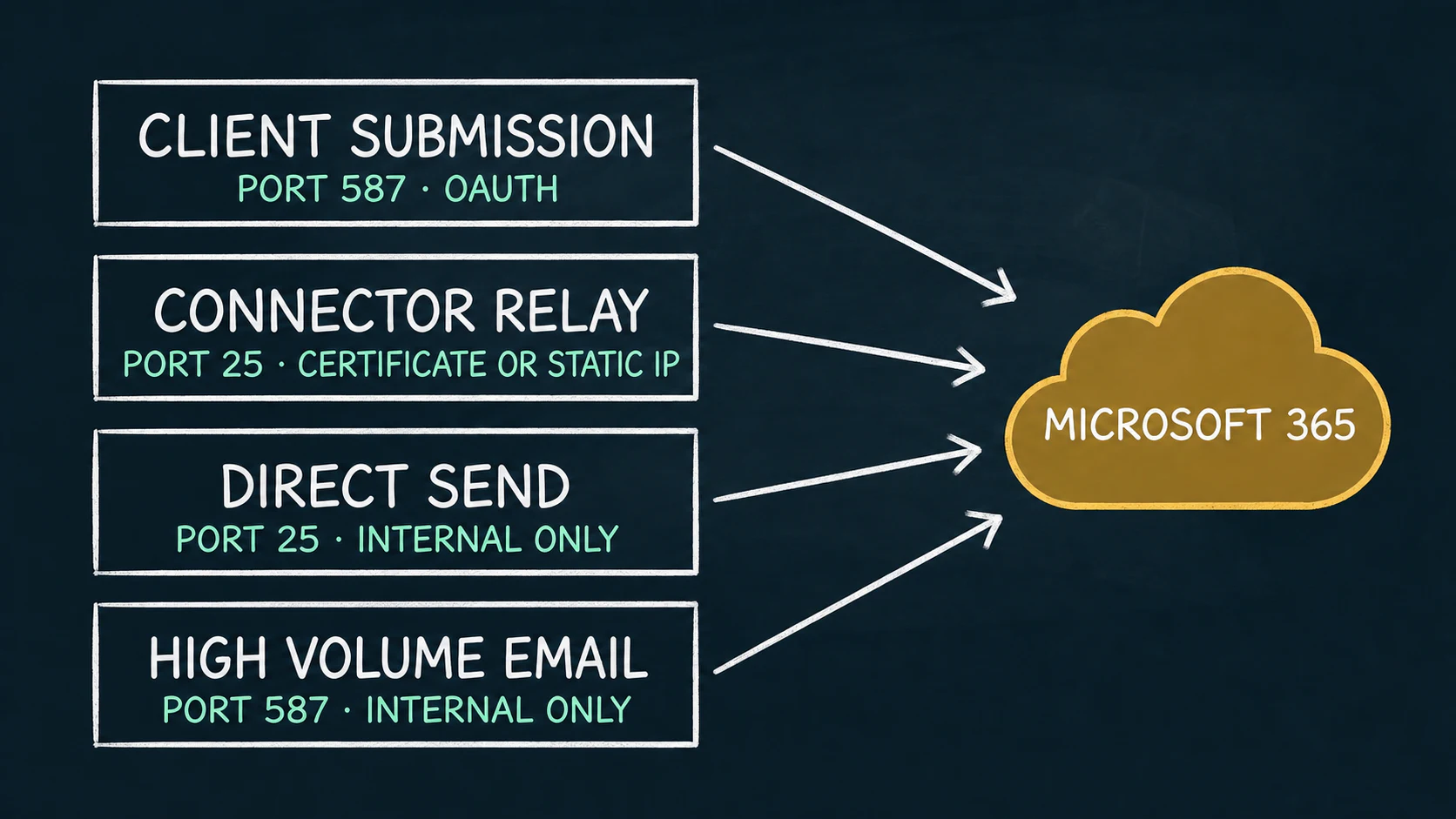
Microsoft documents four relevant sending paths for devices and applications. None is universally best. The right choice follows from who must receive the mail, how the sender can authenticate, whether TCP port 25 is available, and whether the sending system can meet current TLS requirements.
Make the mail-flow decision before configuring the device
A printer settings page may reduce the problem to server, port, username, and password. Exchange Online sees a larger system: tenant attribution, sender authorization, recipient scope, abuse controls, transport security, and retry behavior. A configuration can therefore connect successfully and still be the wrong architecture.
Use the comparison below as a screening tool. Microsoft changes service capabilities and limits over time, so confirm the linked Microsoft documentation before a production rollout.
The four Microsoft 365 paths at a glance
| Method | Endpoint and port | Identity | Recipients | Key dependency |
|---|---|---|---|---|
| Client SMTP submission | smtp.office365.com587 recommended | Licensed mailbox; OAuth recommended | Internal and external | SMTP AUTH, modern TLS, mailbox limits |
| Connector SMTP relay | Tenant MX endpoint 25 | Inbound connector using a TLS certificate or static unshared public IP | Internal and external | Port 25 and connector identity |
| Direct Send | Tenant MX endpoint 25 | No mailbox sign-in or connector | Internal only | Port 25, accepted-domain sender, internet mail-server hygiene |
| High Volume Email | smtp.hve.mx.microsoft587 | HVE account credentials or OAuth | Internal only | HVE account, billing policy, modern TLS |
Microsoft now recommends smtp.hve.mx.microsoft. The older smtp-hve.office365.com endpoint is documented for future deprecation.
1. Client SMTP submission
Client submission authenticates through a cloud mailbox. Microsoft recommends OAuth, requires TLS 1.2 or TLS 1.3, and recommends TCP port 587. It can send to recipients inside and outside the organization and can originate from changing public IP addresses.
The designated mailbox must be licensed, SMTP AUTH must be permitted by the effective organization and mailbox settings, and the authenticated identity needs Send As permission when the visible sender differs. Mailbox sending limits apply, including the documented 30 messages-per-minute and 10,000-recipient daily limits.
Choose it when
The application supports OAuth and XOAUTH2, needs external delivery, and can operate within mailbox limits.
Avoid assuming
A checkbox labeled “SMTP authentication” does not prove OAuth support. Many devices implement only username-and-password mechanisms.
2. Connector-based SMTP relay
Connector relay sends to the tenant MX endpoint on TCP port 25. An Exchange Online inbound connector attributes the traffic to the organization by validating a TLS certificate—the recommended method—or a static public IP address that is not shared with another organization.
A licensed mailbox is not required, the sender can use an address in an accepted domain, and delivery can include external recipients. The sending device or server must retry temporary failures and remain within Microsoft’s reasonable sending limits.
For IP-based connectors, Microsoft explicitly says dynamic addresses are not supported or allowed. Certificate-based connectors remove the static-IP identity requirement, but still require port 25, current TLS, and a suitable certificate on the sending system.
3. Direct Send
Direct Send delivers anonymously to the tenant MX endpoint on port 25 without a mailbox sign-in or connector. It is limited to recipients hosted in the same Microsoft 365 organization. Mail to external recipients is rejected.
Microsoft recommends this only for advanced customers prepared to operate the sender like an internet mail server. A static public IP is recommended so the accepted domain can publish SPF, and Microsoft also calls for correct DKIM and DMARC configuration. Messages receive the same scanning applied to anonymous internet mail.
Direct Send is therefore not simply “SMTP without a password.” It moves reputation, DNS authentication, port 25 reachability, and mail-server operating responsibilities to the customer.
4. High Volume Email
High Volume Email is a dedicated Microsoft 365 service for high-volume mail to internal recipients. It uses port 587 with STARTTLS and supports an HVE account credential or OAuth token. The service is separate from ordinary mailbox SMTP AUTH controls.
Microsoft currently documents no recipient-rate or message-rate limit, while still enforcing other boundaries: up to 50 recipients per message, a 10 MB maximum message size, internal recipients only, connection limits, and up to 100 HVE accounts per tenant. HVE uses Microsoft 365 pay-as-you-go billing through an Azure-linked billing policy.
HVE is a strong fit for internal notifications at scale. It is not an external transactional-email path and does not solve a device that cannot meet its TLS or authentication requirements.
How to choose
- 01
Define recipient scope
If any recipient is external, remove Direct Send and HVE from the shortlist.
- 02
Inventory the client
Confirm STARTTLS behavior, TLS versions, OAuth/XOAUTH2 support, certificate capability, sender control, and retry behavior.
- 03
Test the network path
Determine whether ports 587 and 25 are permitted and whether the site has an exclusive static public IP or can present an accepted-domain certificate.
- 04
Match volume and operations
Account for mailbox limits, HVE recipient scope and billing, connector administration, monitoring, logs, queueing, and failure recovery.
Where RelayBridge fits
RelayBridge is not a fifth Microsoft-hosted sending service. It is a local compatibility bridge for devices and applications that can produce SMTP mail but cannot implement the selected modern upstream path themselves.
The v1.0 design accepts mail from explicitly configured local sources, persists accepted messages in a durable queue, and delivers directly to Exchange Online over port 587 using TLS, OAuth, and XOAUTH2. Its certificate-based application identity and scoped Exchange Application RBAC are designed to constrain sender authorization without depending on a static public IP or outbound port 25.
The local intake hop does not currently support STARTTLS and must remain inside a deliberately trusted private-network boundary. RelayBridge is pre-release, so evaluate the architecture through how it works and the current security model, not as production setup documentation.
Frequently asked questions
Which option supports external recipients?
Client SMTP submission and connector-based SMTP relay support external recipients. Direct Send and HVE are limited to recipients inside the Microsoft 365 organization.
Does connector relay always require a static public IP?
No. Microsoft recommends certificate-based connector authentication. A static unshared public IP is required when the connector uses IP identity instead.
Does HVE replace ordinary SMTP AUTH?
No. HVE is a dedicated internal high-volume service with its own accounts, endpoint, limits, and pay-as-you-go billing model.
Can client submission work from a dynamic public IP?
Yes. Microsoft documents client submission as usable from any location or IP address, provided the client meets its mailbox, authentication, TLS, and sending-limit requirements.
Is RelayBridge an SMTP relay provider?
No. RelayBridge runs locally in administrator-controlled infrastructure and is designed to deliver directly to Exchange Online rather than through a RelayBridge-operated cloud relay.