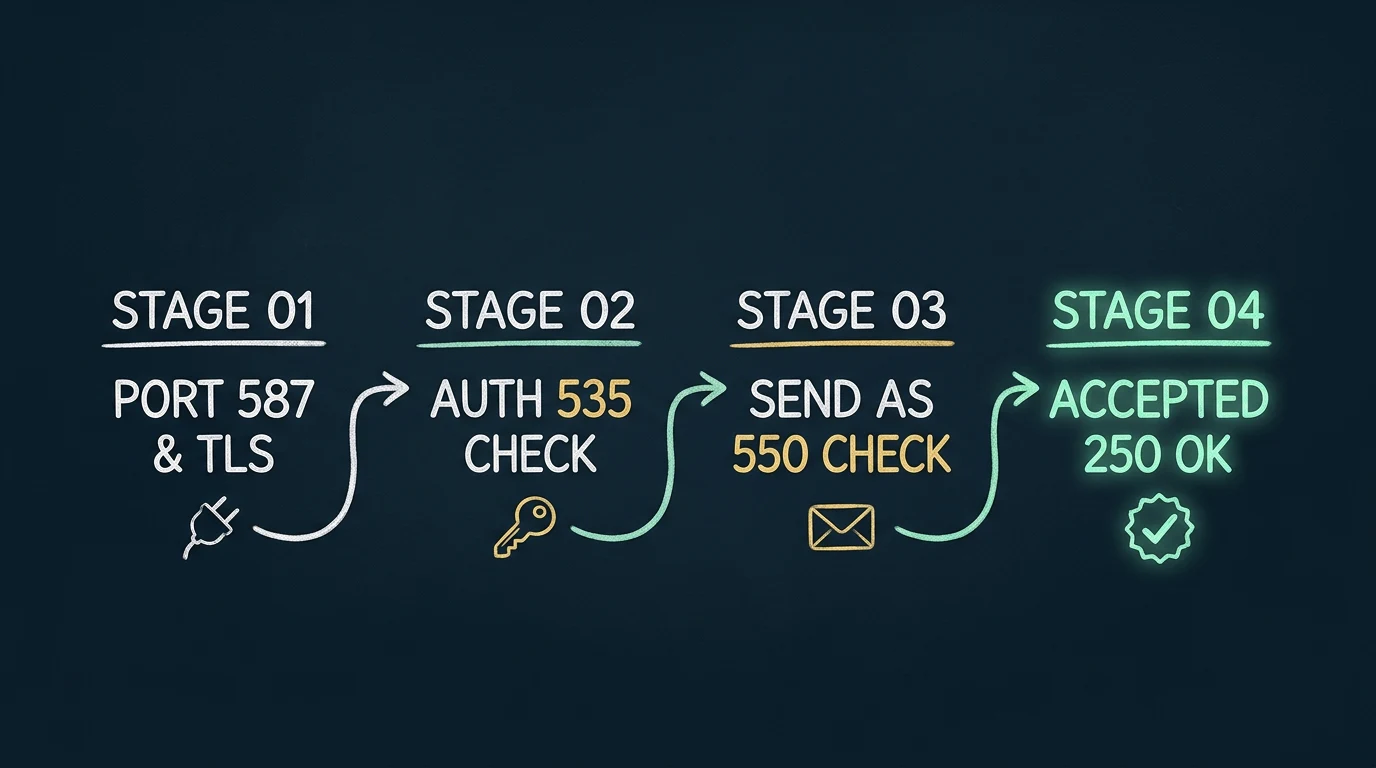
Do not discard the suffix
A code such as 535 5.7.139 can appear with different explanatory text. That text distinguishes a disabled SMTP AUTH setting from an authentication-policy rejection or a federated identity problem. Troubleshooting from the number alone can produce the wrong fix.
Preserve the complete Exchange response
Collect the timestamp, endpoint, port, client IP, authenticated identity, envelope sender, header From address, recipient, and every line returned by the server. Device displays often truncate the useful part, so enable SMTP logging or reproduce the test from a controlled host when possible.
Do not “fix” an authentication error by broadly disabling Security Defaults, MFA, or Conditional Access. First determine whether the client can use OAuth or whether a different Microsoft-supported sending path is more appropriate.
Find the failing SMTP stage
| Stage | Typical evidence | First checks |
|---|---|---|
| DNS / TCP | Timeout, name-resolution failure, connection refused | Endpoint, port, DNS, firewall, ISP egress |
| STARTTLS | Disconnect or handshake failure before authentication | TLS version, cipher overlap, STARTTLS mode, certificate trust, clock |
| AUTH | 535, 5.7.3, 5.7.57 | Authentication method, token or credential, effective SMTP AUTH controls |
| MAIL FROM | 5.7.60, anonymous-mail or sender errors | Authenticated identity, envelope sender, Send As authorization |
| RCPT TO | Relay or recipient-scope rejection | Direct Send scope, connector attribution, recipient validity |
| Submission / queue | Quota, concurrency, or transient service response | Rate, daily recipients, concurrent sessions, retry policy |
535, 5.7.3, and 5.7.139 authentication errors
Microsoft’s troubleshooting guidance groups 535 5.7.3 Authentication unsuccessful and 5.7.57 Client not authenticated to send mail around the authenticated-submission path. Verify that the client is using smtp.office365.com, that it is actually authenticating, and that its authentication method is allowed.
For ordinary SMTP AUTH, inspect both levels of Exchange control:
Get-TransportConfig | Format-List SmtpClientAuthenticationDisabledshows the organization setting.Get-CASMailbox -Identity <MailboxIdentity> | Format-List SmtpClientAuthenticationDisabledshows the mailbox override.
A mailbox value of False means enabled, True means disabled, and a blank value inherits the organization setting. Those settings do not make a password-only client compatible with a policy that requires modern authentication.
Why 535 5.7.139 needs its full text
Microsoft documents multiple suffixes, including disabled SMTP client authentication, a request that does not meet authentication criteria, and federated STS reachability or HTTPS failures. HVE also has its own 535 5.7.139 organization-configuration response on its dedicated endpoint. Match the entire message to the endpoint and identity type before changing anything.
550 5.7.60 and Send As failures
5.7.60 SMTP; Client doesn't have permissions to send as this sender means the authenticated mailbox is submitting with another sender address and lacks the required Send As permission. Compare three values: the identity used during AUTH, the SMTP envelope MAIL FROM, and the message header From:.
If one mailbox legitimately submits as another, grant narrowly scoped Send As permission and verify it. If a fleet must use arbitrary addresses in an accepted domain, connector relay may fit better than mailbox client submission. Do not solve the mismatch by granting broad sender access without an explicit requirement.
550 5.1.8 Bad outbound sender is different: Microsoft associates it with a sender blocked in the Restricted Users portal. Check the exact response instead of treating every 550 as a permission problem.
Relay and tenant-attribution errors
5.7.57 Client was not authenticated to send anonymous mail during MAIL FROM commonly appears when a device connects to smtp.office365.com but does not authenticate. Direct Send and connector relay use the tenant MX endpoint instead; changing only the credentials does not convert one architecture into another.
5.7.64 TenantAttribution; Relay Access Denied points to connector identity. Microsoft identifies a changed or mismatched static source IP or TLS certificate as common causes. Confirm the public egress address seen by Microsoft, the connector configuration, and the certificate subject or SAN used on the connection.
Direct Send has a separate scope boundary: it delivers only to recipients inside the organization. An external-recipient failure is expected behavior, not a connector defect.
Throttling, concurrency, and submission limits
Ordinary authenticated SMTP submission is documented at 30 messages per minute and 10,000 recipients per day. Microsoft also allows up to three concurrent connections for a mailbox; additional simultaneous sessions can receive 432 4.3.2 Concurrent connections limit exceeded.
Exceeding the per-minute rate causes throttling and delayed carryover. Exceeding the daily recipient limit can return 554 5.2.0 STOREDRV.Submission.Exception:SubmissionQuotaExceededException. A full Sent Items mailbox can produce a different 554 5.2.2 quota error.
Retry temporary 4xx responses with bounded backoff. Do not endlessly retry permanent 5xx authorization, sender, recipient, or configuration failures; surface them for administrative action.
TLS failures can happen before any SMTP error code
Client SMTP submission requires STARTTLS with TLS 1.2 or TLS 1.3. A device offering only TLS 1.0/1.1 or obsolete cipher suites may disconnect during the handshake and never reach AUTH, so its log may contain only a generic connection or certificate error.
First test TCP reachability on port 587, then test the STARTTLS negotiation. Confirm that the device is not attempting implicit TLS on port 465, that its clock is correct, and that its trust store can validate the service certificate. The dedicated legacy-TLS endpoint exists as an opt-in compatibility measure, but Microsoft marks those older TLS versions unsupported; it should not be treated as the modern target architecture.
The deeper TLS handshake guide separates port, protocol, cipher, certificate, and authentication failures.
A disciplined diagnostic workflow
- 01
Identify the chosen sending method
Record the endpoint, port, intended recipient scope, and whether identity is a mailbox, connector, HVE account, or no authentication.
- 02
Prove DNS and TCP reachability
Test from the same network path as the device. A successful port test does not prove TLS or authentication.
- 03
Prove STARTTLS
Capture the negotiated TLS version, cipher, certificate validation result, and where the handshake stops.
- 04
Validate identity and authorization
Check the exact OAuth or credential flow, effective SMTP AUTH controls, sender match, Send As permissions, or connector identity.
- 05
Classify the response
Separate transient retryable failures from permanent configuration failures and preserve the Exchange correlation text for message trace or support.
How RelayBridge changes the diagnostic boundary
RelayBridge is designed to separate local device intake from Exchange Online delivery. A device submits to a controlled local listener; RelayBridge durably queues the accepted message and owns the modern OAuth, XOAUTH2, TLS, retry, and upstream logging path.
That architecture can make temporary failures survivable and centralize diagnostics, but it does not bypass Microsoft controls. Incorrect Exchange Application RBAC, an unauthorized sender, a blocked network path, or a permanent recipient rejection must still be corrected. RelayBridge should expose those failures rather than repeatedly masking them.
Inbound STARTTLS is not currently available, so the local hop remains restricted to explicitly configured sources on a trusted private network. RelayBridge is pre-release and this article is diagnostic guidance, not a setup procedure.
Frequently asked questions
Does 535 5.7.139 always mean SMTP AUTH is disabled?
No. That code appears with multiple explanatory suffixes. Preserve and interpret the complete server response, endpoint, and authentication method.
What causes 550 5.7.60?
The authenticated mailbox is attempting to send as another address without the required Send As permission. Compare the AUTH identity, envelope sender, and header From value.
Why does Direct Send fail for an external recipient?
Direct Send is intentionally limited to recipients inside the Microsoft 365 organization. Use an external-capable method when external delivery is required.
Should every SMTP failure be retried?
No. Retry temporary 4xx responses with bounded backoff. Permanent 5xx authorization and configuration errors require intervention.
Does a final SMTP 250 response prove inbox delivery?
No. It proves acceptance at the SMTP boundary. Filtering, rules, routing, quarantine, and downstream delivery still follow; use Exchange message trace for later events.
Official Microsoft references
- Microsoft Learn — Fix issues with printers, scanners, and LOB applications that send email using Microsoft 365
- Microsoft Learn — Enable or disable SMTP AUTH in Exchange Online
- Microsoft Learn — NDRs and SMTP errors in Exchange Online
- Microsoft Learn — SMTP authenticated submission throttling
- Microsoft Learn — Message trace in the Exchange admin center