Identity meets network reality
A mail configuration that works at headquarters can fail across stores, clinics, warehouses, and small offices. The device settings may be identical while every branch uses a different ISP, changing address, carrier NAT, security service, failover path, or port policy.
The branch-office problem
Legacy printers, scanners, and applications often understand only a narrow form of SMTP. They may be unable to use Microsoft OAuth, current TLS, or an accepted-domain certificate. Their branch internet connection may also lack a stable, exclusive public IP or an unrestricted outbound port 25 path.
Those are separate constraints: device capability, Microsoft identity, recipient scope, and network reachability. A sound design evaluates each constraint before selecting connector relay, client submission, Direct Send, a central corporate relay, or a compatibility bridge.
How Microsoft 365 identifies SMTP traffic
Microsoft documents several ways for devices and applications to send mail. They do not share the same identity model, network endpoint, recipient scope, or operational responsibility.
Connector-based SMTP relay
At a branch, connector relay normally reaches the tenant MX endpoint on TCP port 25. The inbound connector needs a stable organization-attribution signal: Microsoft recommends a TLS certificate; the alternative is an exclusive static public IP. Shared or changing egress addresses cannot provide that IP identity reliably.
Authenticated client submission
Client submission uses smtp.office365.com, normally on port 587. It can send to internal and external recipients, but the sender must use a supported authentication model and current TLS. Microsoft recommends OAuth instead of Basic authentication.
Direct Send and HVE
Direct Send uses the tenant MX endpoint on port 25 without an inbound connector and is limited to recipients inside the organization. High Volume Email uses a dedicated HVE account and port 587 for internal high-volume mail, with its own service and billing constraints.
Why dynamic IP, CGNAT, and port 25 matter
Microsoft explicitly states that dynamic IP addresses are not supported or allowed for IP-based connector relay. If a branch ISP rotates the public address, the new connection no longer matches the connector. Carrier-grade NAT creates a different problem: the branch does not control an exclusive public identity because multiple customers can share the same address.
Cellular failover, managed SD-WAN, and secure-web-gateway paths can also change egress independently of the branch firewall. Private RFC1918 device addresses never reach Microsoft and cannot act as connector identity.
Connector relay and Direct Send also require outbound TCP port 25. A static IP alone is therefore insufficient. The actual device path must permit port 25 during normal operation and WAN failover.
Continuously rewriting an Exchange Online connector whenever a branch address changes turns a security identity into a moving target. It does not solve CGNAT, shared egress, port blocking, or failover gaps.
Available architecture options
Use a certificate-based connector
A capable mail server can present a certificate whose Subject or SAN contains an accepted Microsoft 365 domain. This removes static-IP identity, but still requires current TLS, outbound port 25, retry behavior, logging, and secure certificate handling.
Use native OAuth client submission
A capable device or application can connect to smtp.office365.com with OAuth and current TLS. It can send internally and externally without depending on a static source IP.
Centralize through an existing corporate relay
Branch devices can send over a private WAN or site-to-site VPN to an existing supported mail server that owns identity, queueing, logging, and the Microsoft-facing connection.
Use Direct Send or HVE when the scope fits
Direct Send and HVE can serve internal-recipient scenarios, but each has distinct network, identity, policy, volume, and operational requirements.
Introduce a compatibility bridge
A bridge can accept the constrained SMTP capability already present, then own modern authentication, TLS, durable queueing, and upstream retry. Its device-facing listener must remain explicitly restricted.
The right choice depends on recipient scope, volume, device capability, existing mail infrastructure, network paths, availability requirements, and who will operate the service.
Compatibility-layer option
How RelayBridge fits
RelayBridge v1.0.0-rc.1 is available as an unsigned local bridge for devices that cannot implement the required Microsoft authentication and transport themselves. A restricted device submits SMTP to RelayBridge; RelayBridge durably persists the accepted message and sends it to Exchange Online using certificate-based OAuth, XOAUTH2, mandatory TLS, and outbound port 587.
The RC1 Microsoft-facing path does not use a source-IP connector. Microsoft authorizes the application identity and scoped sender rather than treating a branch public IP as the credential. It also avoids a branch port 25 dependency.
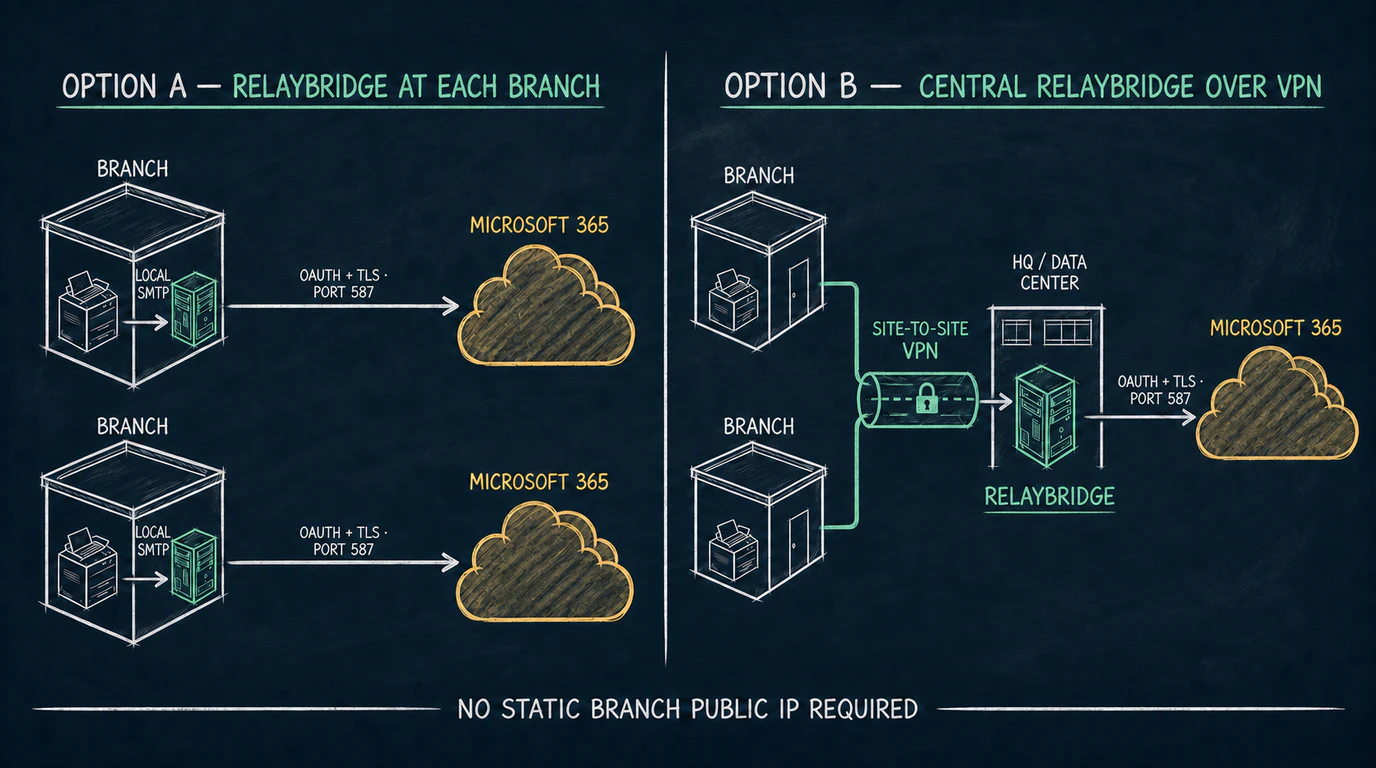
After selecting RelayBridge as the compatibility layer, the next question is where the trusted listener and durable queue should run: at every branch, or centrally at headquarters or in a data center.
Option A: RelayBridge at each branch
Devices submit across the local branch network. Each site owns its RelayBridge host, queue, certificate lifecycle, monitoring, and direct Microsoft 365 connection.
Option B: Central RelayBridge over VPN
Branch devices route SMTP through a site-to-site VPN to one central instance. The central service owns queueing, certificate identity, monitoring, and the Microsoft 365 connection.
Distributed queue pattern
RelayBridge at each branch
A local instance accepts messages without depending on the branch-to-headquarters VPN. If the branch internet connection or Microsoft 365 is temporarily unavailable, RelayBridge can retain accepted messages in its local durable queue and retry upstream.
The tradeoff is operational multiplication. Every instance needs a supported host, restricted listener, protected certificate and private key, disk capacity, updates, monitoring, backup decisions, and recovery testing. This can suit large or isolated sites, but becomes expensive across many small branches.
Centralized operations pattern
Central RelayBridge over site-to-site VPN
This topology keeps installation, certificate handling, queue monitoring, patching, and outbound policy in one controlled location. The branch public internet address is not part of the mail path: the device reaches the central site through private routed connectivity, and the central RelayBridge makes the authenticated Microsoft 365 connection.
The central model depends on VPN reachability and shared central infrastructure. If the private route is unavailable, a branch device cannot reach the queue until connectivity returns. The central host, storage, network path, and combined workload therefore need appropriate monitoring, capacity, recovery, and availability planning.
Choosing between central and per-branch deployment
Prefer central when
Branches already have reliable site-to-site VPN connectivity; centralized operations are a priority; branch devices can retry during VPN interruptions; and the central platform can be made appropriately resilient.
Prefer per-branch when
Local submission must continue during WAN or VPN outages; the site has suitable local compute and operational ownership; or local queue isolation matters more than minimizing instance count.
A mixed model can be reasonable
Large or connectivity-sensitive sites can run local instances while smaller branches use a central service. Keep sender policy, certificate ownership, monitoring, and recovery responsibilities explicit in either model.
Security requirements
RelayBridge does not currently provide inbound STARTTLS for the device-facing SMTP hop. In a central topology, the site-to-site VPN supplies transport protection between the branch and central network, but it does not replace source restrictions or sender policy. In a per-branch topology, device SMTP must remain on a trusted local network.
- Never publish the local SMTP listener directly to the internet.
- Restrict access to the exact branch subnets or device addresses that require service.
- Constrain permitted senders and validate Exchange Application RBAC scope.
- Protect and rotate the certificate private key used for Microsoft identity.
- Monitor queue depth, disk usage, authentication failures, VPN reachability, and Microsoft 365 responses.
- Test service restart, WAN failover, VPN failure, certificate rotation, and storage recovery.
Current limitations and planning boundaries
- Inbound STARTTLS is not currently available, so the device-facing path requires a trusted private network or VPN.
- A central instance creates a shared dependency on the VPN, central host, storage, and network path.
- A per-branch design multiplies hosts, certificates, monitoring, patching, and recovery work.
- Device retry behavior varies; some devices may report immediate failure instead of waiting for connectivity to return.
- Microsoft 365 SMTP acceptance does not guarantee inbox placement.
RelayBridge v1.0.0-rc.1 is available as an unsigned pre-release for evaluation and community testing. Treat both topologies as planning guidance until stable release documentation confirms supported device counts, source and sender configuration, message volume, central-instance sizing, and operating procedures. Review the current Microsoft 365 security model and release status.
Branch deployment checklist
- 01
Confirm recipient scope
Separate internal-only notifications from mail that must reach external recipients.
- 02
Inventory device capability
Record OAuth, TLS, certificate, sender, attachment, retry, and logging support for each device type.
- 03
Map real network paths
Document public egress, CGNAT, port 25 and 587 access, VPN routing, and primary and failover behavior.
- 04
Choose the queue location
Decide whether messages should be accepted at each branch or only after reaching the central site.
- 05
Restrict the listener
Allow only required devices, source addresses, and senders. Confirm no public or unintended inter-site route can reach it.
- 06
Assign operational ownership
Define responsibility for certificates, Exchange scope, patching, monitoring, capacity, backups, and incident response.
- 07
Pilot with real devices
Test attachments, sender restrictions, queue recovery, duplicates, error reporting, WAN failover, and VPN failure.
Frequently asked questions
Does every branch need its own RelayBridge instance?
No. Branch devices can reach a central RelayBridge at headquarters or in a data center over a properly restricted site-to-site VPN. A local instance is useful when the branch needs local queueing or greater independence from the VPN.
Can one central RelayBridge serve multiple branches?
That is a valid architecture to evaluate when branch subnets are privately routed, access is tightly restricted, and the central host is operated as shared infrastructure. Confirm final v1.0 source, sender, scale, and capacity limits before production.
Does a branch need a static public IP?
Not for RelayBridge's intended authenticated submission path. The Microsoft 365 connection uses OAuth and TLS on port 587 rather than source-IP connector identity.
What happens when the site-to-site VPN is down?
In the central model, branch devices cannot reach the central queue until the private route returns. Device retry behavior and VPN resilience therefore matter. A per-branch instance can accept and queue locally while its upstream path is unavailable.
Should the central SMTP listener be exposed publicly?
No. Keep it behind the private VPN and firewall it to the exact branch sources that require access. RelayBridge is not intended to be an internet-facing open relay.
Do all Exchange Online connectors require a static IP?
No. Microsoft recommends certificate-based connector authentication as an alternative, but connector relay still requires a suitable certificate, current TLS, and outbound port 25.
Official Microsoft references
- Microsoft Learn — Set up a multifunction device or application to send email using Microsoft 365
- Microsoft Learn — Fix issues with printers, scanners, and LOB applications
- Microsoft Learn — Fix 550 5.7.64 TenantAttribution errors
- Microsoft Learn — Exchange Online integration for outbound application email