Current documented limits
Capacity is per submitting mailbox, not per device.
Microsoft currently documents a maximum of three concurrent SMTP Authenticated Submission connections, 30 messages per minute, and 10,000 recipients per day for a mailbox. Several devices sharing one submission identity share the same budget.
| Limit | Current value | Operational meaning |
|---|---|---|
| Concurrent connections | 3 | A fourth connection can receive 432 4.3.2 Concurrent connections limit exceeded. |
| Message rate | 30 messages/minute | Excess submissions are throttled and can be carried into following minutes, producing delay. |
| Recipient rate | 10,000 recipients/day | Recipients count, not only messages. Exceeding the daily quota causes submission failure. |
RelayBridge, another relay, or parallel devices cannot bypass Exchange Online service limits. If sustained demand exceeds the supported method, choose a mail-flow service designed for that workload.
What Exchange does
Throttling is not the same as silently dropping every excess message.
Microsoft says messages beyond the per-minute limit are throttled and carried into following minutes, which can delay delivery. Clients should be prepared to retry when the service returns a transient response. A queue that honors the response and applies controlled retry is safer than a client that abandons the message or reconnects aggressively.
The daily recipient quota is different. Microsoft documents 554 5.2.0 STOREDRV.Submission.Exception:SubmissionQuotaExceededException after that limit is exceeded. Repeated rapid retries cannot create new daily capacity and may hide the actual planning problem.
Sent-copy behavior can create another constraint: authenticated submission can store messages in the mailbox’s Sent Items, so a high-volume or poorly maintained mailbox can also encounter storage pressure.
Evidence first
Keep the complete SMTP response and the local queue state.
A generic “send failed” message is not enough. Record the timestamp, submission identity, connection count, recipient count, full enhanced status code, retry decision, and final Exchange response. The leading digit matters: a 4xx response is normally transient; a 5xx response requires classification before retry.
432 4.3.2 concurrent connections exceeded
Reduce parallel connections for that submission identity. Connection pooling and a single controlled delivery worker are usually more useful than immediate reconnect storms.
Messages delayed around a busy minute
Compare enqueue time with Exchange acceptance time. A temporary backlog can be expected when a burst exceeds 30 messages per minute even though average daily traffic is low.
SubmissionQuotaExceededException
Count recipients across the mailbox’s daily traffic and investigate whether one message expands to many recipients. This is not solved by shorter retry intervals.
Mailbox storage warnings
Review Sent Items and retention behavior for the submission mailbox rather than assuming the SMTP connection itself is the only bottleneck.
For non-capacity failures, use the Exchange Online SMTP error guide to distinguish authentication, authorization, relay attribution, TLS, and throttling.
Workload examples
Design for peak arrival rate, not the daily average.
Multiple MFPs at shift change
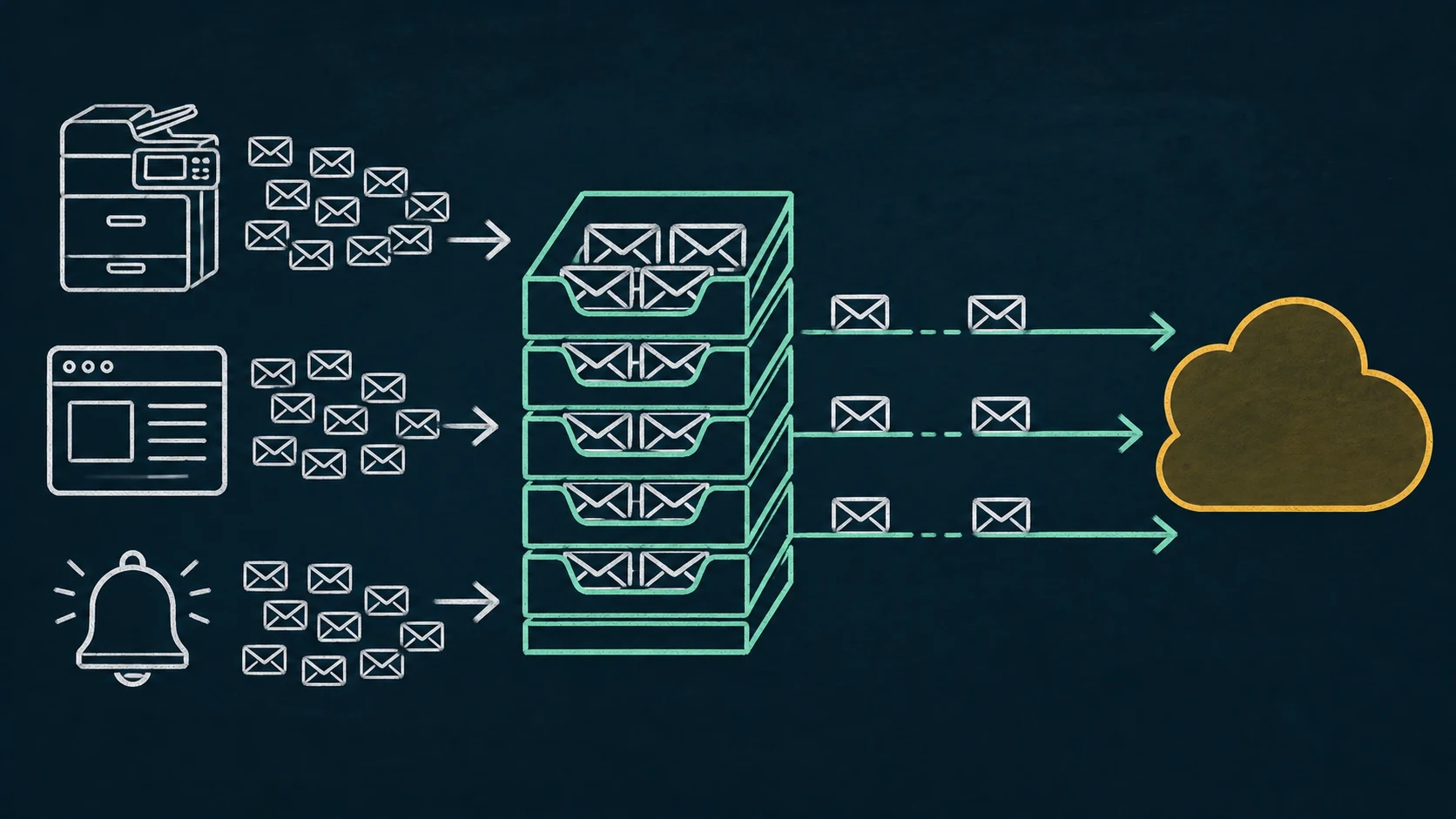
Ten devices may be quiet all day and then submit scans at once. A local queue can accept authorized messages durably and serialize delivery, but users should see that Exchange acceptance may take longer during the burst.
ERP batch notifications
A job producing hundreds of separate messages may take multiple minutes to drain. Determine whether the workload belongs on SMTP client submission or on an application-oriented service with appropriate throughput.
Monitoring and alert storms
An incident can cause many systems to emit repeated alerts simultaneously. Apply deduplication and escalation logic at the monitoring source where possible; a mail queue should not become the only incident-control mechanism.
Average volume helps size retention, but burst shape determines queue depth and user-visible delay. Capacity planning should include upstream outage duration as well as Microsoft throttling.
Durable local delivery
Where RelayBridge fits—and where it does not.
RelayBridge can durably accept authorized local messages, use a controlled Exchange Online delivery path, persist retries across process restarts, and smooth short bursts from multiple legacy clients. The mail remains on the local host until Exchange accepts it; there is no RelayBridge-operated cloud relay.
This improves resilience at the compatibility boundary but does not promise delivery beyond Exchange acceptance semantics or add Microsoft quota. Review the queue and delivery architecture and the security boundary. RelayBridge is an independent project, not Microsoft endorsed or certified; its MPL-2.0 application source is public.
If senders already implement robust OAuth SMTP, your application can use a suitable API, an existing MTA provides the required durability, or the workload needs a higher-volume Microsoft service, adding another local bridge is unnecessary.
Capacity checklist
Measure, queue, pace, and alert.
- 01
Count identities and shared clients
Map every sender using the same mailbox so its connection and rate budget is visible.
- 02
Measure peak minute and recipient fan-out
Capture arrival distribution, recipients per message, daily recipients, and the longest acceptable delay.
- 03
Persist before acknowledging
Only acknowledge local acceptance after the message is durably stored if the client expects the relay to own retry.
- 04
Classify upstream responses
Back off transient 4xx responses and surface durable 5xx failures for operator action rather than retrying everything identically.
- 05
Alert on age and depth
Queue age is often more actionable than queue count. Alert before delayed operational mail becomes invisible.
Clarifications
Frequently asked questions.
Does Exchange drop message 31 in a minute?
Microsoft describes throttling and carry-over into following minutes, which produces delay. Clients still need correct transient-response handling.
Are 30 messages and 10,000 recipients the same measure?
No. One message can have multiple recipients. The per-minute message rate and daily recipient rate constrain different dimensions.
Can adding more parallel connections drain a queue faster?
Not beyond the documented limit. A fourth simultaneous connection can receive a 432 response, so uncontrolled parallelism can make recovery worse.
Authoritative sources